Vulnerability Response Time Calculator
GeneralEnter a discovery date, remediation date, and SLA target to instantly see whether your team met the patch deadline. Works for Critical (1-day), High (7-day), Medium (30-day), and Low (90-day) severity classifications.
Last updated: April 2026
This calculator is designed for real-world usage based on typical engineering scenarios and publicly available documentation.
A vulnerability response time calculator measures the elapsed calendar days between when a security flaw is discovered and when a patch or mitigation is applied. Security teams use this metric to enforce SLA compliance under frameworks like CVSS, NIST SP 800-40, and ISO 27001. Response time targets are determined by severity. Industry baselines treat Critical vulnerabilities as a 1-day SLA, High as 7 days, Medium as 30 days, and Low as 90 days. Breaching these windows increases exploitation risk — the majority of weaponized CVEs are exploited within 7 days of public disclosure, so slow remediation directly widens the attack surface. This calculator is useful for vulnerability management programs, security operations centres (SOCs), DevSecOps pipelines, and compliance audits. Feed it the timestamp your scanner flagged a finding and the date your team shipped a fix to instantly determine whether you met the SLA or how many days overdue the response was. For tracking SLA targets across your full CVE inventory rather than individual findings, pair this tool with the Patch SLA Calculator. For a broader view of your unmitigated CVE exposure window, use the CVE Exposure Calculator.
How to Calculate Vulnerability Response Time
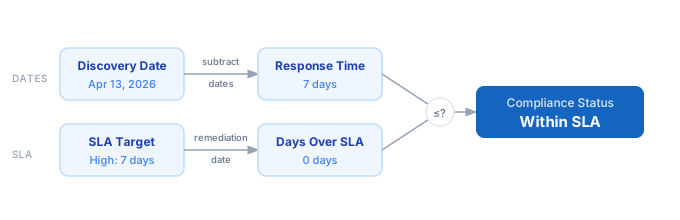
1. Enter the date your scanner or security team first identified the vulnerability in the Discovery Date field. 2. Enter the date your team deployed a patch, applied a mitigation, or confirmed remediation in the Remediation Date field. 3. Set the SLA Target (days) to your organisation's policy: Critical = 1 day, High = 7 days, Medium = 30 days, Low = 90 days. 4. The calculator subtracts the discovery date from the remediation date to get the actual response time in calendar days. 5. It compares the response time against your SLA target and reports whether the team met the deadline, and by how many days they were ahead or behind.
Formula
Response Time (days) = Remediation Date − Discovery Date  (calendar days)

SLA Target by Severity:
  Critical → 1 day   (actively exploited or CVSS ≥ 9.0)
  High     → 7 days  (CVSS 7.0–8.9)
  Medium   → 30 days (CVSS 4.0–6.9)
  Low      → 90 days (CVSS 0.1–3.9)

Days Over SLA  = Response Time − SLA Target
                 (negative = days ahead of deadline)
SLA Compliant  = Response Time ≤ SLA Target
Example Vulnerability Response Time Calculations
Example 1 — Critical CVE patched same day
Discovery:     Jan 15, 2026
Remediation:   Jan 15, 2026
Response Time: 0 days
SLA Target:    1 day  (Critical)
               ─────────────────
0 ≤ 1  →  ✓ Within SLA — 1 day to spare
Example 2 — High severity CVE with SLA breach
Discovery:     Mar 1, 2026
Remediation:   Mar 12, 2026
Response Time: 11 days
SLA Target:    7 days  (High)
               ─────────────────
11 > 7  →  ✗ SLA breached — 4 days overdue
Example 3 — Medium severity finding resolved within SLA
Discovery:     Feb 1, 2026
Remediation:   Feb 24, 2026
Response Time: 23 days
SLA Target:    30 days  (Medium)
               ─────────────────
23 ≤ 30  →  ✓ Within SLA — 7 days to spare
Tips to Improve Vulnerability Response Time
- › Track CVSS scores at intake — assigning the wrong severity can cause you to apply a lenient SLA to a Critical finding. Your specific asset context may warrant a higher severity than the NVD base score.
- › Use the Patch SLA Calculator to define organisation-wide SLA targets before incidents occur, so teams know their deadlines without escalation.
- › Automate remediation date capture via your ticketing system (Jira, ServiceNow, Linear) — manual entry is a leading source of inaccuracy in SLA compliance audits.
- › Check exploitation status at disclosure. CVEs listed in CISA's Known Exploited Vulnerabilities (KEV) catalog should be treated as Critical regardless of CVSS score.
- › Log every SLA waiver. When a business constraint forces a breach, document the risk acceptance with the asset owner — auditors require a paper trail to distinguish negligence from deliberate risk decisions.
- › Review your Mean Time to Remediate (MTTR) by severity tier monthly. This KPI is the primary benchmark for vulnerability management program maturity and is required reporting under several compliance frameworks.
Notes
- › Results are estimates and may vary based on actual usage.
- › Always validate against your production environment.