Patch SLA Calculator
GeneralEnter a CVE discovery date and severity level to instantly calculate your patch deadline, days remaining, and SLA compliance status. No sign-up required.
Last updated: April 2026
This calculator is designed for real-world usage based on typical engineering scenarios and publicly available documentation.
A patch SLA calculator helps engineering and security teams determine exactly when a vulnerability must be remediated — no guesswork, no mental arithmetic. Feed in a CVE discovery date and severity level, and you get a hard deadline with a status flag showing whether you are on track, at risk, or already in breach. Patch SLA failures are one of the most common audit findings in SOC 2, ISO 27001, and PCI DSS reviews. Most organisations operate with four severity tiers: Critical (24 hours), High (7 days), Medium (30 days), and Low (90 days). These thresholds come from CVSS scoring, but many teams apply additional overrides for internet-facing assets or vulnerabilities with known active exploits. This calculator targets security engineers, DevSecOps leads, and vulnerability management teams who need to quickly triage whether an outstanding CVE is at risk of breaching its SLA. It is also useful for compliance teams preparing for audits — run through a batch of CVE discovery dates and severities to identify which remediation tickets are overdue. The formula is straightforward: deadline equals discovery date plus SLA days. Days remaining equals deadline minus today. The status flag — ON TRACK, AT RISK, or BREACHED — gives you an instant compliance read that you can paste directly into a ticket, incident report, or audit evidence pack.
How to Calculate Patch SLA Deadlines by Severity
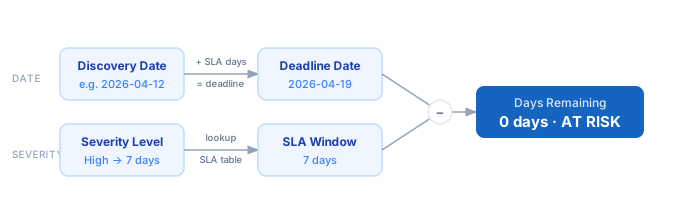
1. Select the severity level of the vulnerability: Critical, High, Medium, or Low. 2. Enter the discovery date — when your team first identified or received the CVE alert. 3. The calculator maps severity to the standard SLA window: Critical = 1 day, High = 7 days, Medium = 30 days, Low = 90 days. 4. The deadline is computed as discovery date + SLA days. 5. Days remaining = deadline − today. A negative number means the SLA is already breached. 6. The status indicator (ON TRACK / AT RISK / BREACHED) gives you an instant compliance read for triage or reporting.
Formula
Deadline       = Discovery Date + SLA Days
Days Remaining = Deadline − Today

SLA Days by Severity:
  Critical → 1 day   (CVSS ≥ 9.0 or known active exploit)
  High     → 7 days  (CVSS 7.0–8.9)
  Medium   → 30 days (CVSS 4.0–6.9)
  Low      → 90 days (CVSS < 4.0)

Status:
  BREACHED  if Days Remaining < 0
  AT RISK   if Days Remaining ≤ 2
  ON TRACK  if Days Remaining > 2
Example Patch SLA Calculations
Example 1 — Critical CVE requiring same-day patch
Discovery Date: 2026-04-18 (yesterday)   Severity: Critical
SLA Days:       1 day
Deadline:       2026-04-19 (today)
Days Remaining: 0  →  Status: AT RISK
─────────────────────────────────────
Emergency patch required today. Pre-stage rollback before deploying.
Example 2 — High severity CVE with time to schedule
Discovery Date: 2026-04-16 (3 days ago)   Severity: High
SLA Days:       7 days
Deadline:       2026-04-23
Days Remaining: 4  →  Status: ON TRACK
─────────────────────────────────────
Schedule fix for the next change window by April 23.
Example 3 — Medium CVE with breached SLA
Discovery Date: 2026-03-10 (40 days ago)  Severity: Medium
SLA Days:       30 days
Deadline:       2026-04-09
Days Remaining: -10  →  Status: BREACHED
─────────────────────────────────────
Overdue by 10 days. Escalate to risk owner and file a formal exception.
Tips for Patch SLA Compliance
- › Treat Critical CVEs as zero-tolerance: a 1-day window means the fix must be tested and deployed the same day the alert lands. Pre-stage rollback plans before patching production.
- › Use the discovery date consistently — never mix the scan date, CVE publish date, and alert-received date across tickets. Inconsistent baselines inflate your apparent compliance rate and hide real risk during audits.
- › Automate SLA breach alerts at 48 hours before a Critical or High deadline. Teams need lead time to schedule emergency change windows — a midnight alert guarantees a scramble.
- › Track Mean Time to Remediate (MTTR) by severity tier. If MTTR for High consistently exceeds the 7-day SLA, your bottleneck is usually change approval, not patching effort — fix the process, not just the tickets.
- › Batch Medium and Low CVEs into monthly and quarterly patch cycles to reduce change-management overhead while still hitting your SLA windows. This also smooths out patching load for ops teams.
- › For internet-facing assets, apply a one-tier severity bump: treat High as Critical and schedule a 1-day window. Exploit probability for exposed assets is significantly higher than the CVSS score alone suggests.
Notes
- › Results are estimates and may vary based on actual usage.
- › Always validate against your production environment.