CVE Exposure Calculator
GeneralEnter a CVE's CVSS score, exploit status, and asset criticality to get a weighted exposure score from 0–100. Built for security engineers who need to prioritise patches across their infrastructure.
Last updated: April 2026
This calculator is designed for real-world usage based on typical engineering scenarios and publicly available documentation.
A CVE exposure calculator gives security teams a single weighted number that captures both the raw severity and the real-world risk context of a vulnerability. CVSS alone does not tell you whether an exploit exists in the wild, how many systems you actually run that are affected, or whether those systems are customer-facing database servers or low-value internal tools. This calculator multiplies four factors — CVSS base score, exploit maturity weight, asset criticality weight, and a logarithmic asset-count factor — then normalises the result to a 0–100 scale. Scores above 75 are Critical, 50–74 are High, 25–49 are Medium, and below 25 are Low. Use these thresholds to drive SLA commitments: Critical in 24 hours, High in 72 hours, Medium in two weeks. Security engineers, platform teams, and DevSecOps leads use this tool when triaging NVD advisories, reviewing Dependabot alerts, or preparing a patch deployment schedule. It works equally well for OS-level CVEs, library vulnerabilities found by Trivy or Grype, and cloud provider advisories. Run it after each new CVE disclosure to immediately classify it. Re-run it after applying compensating controls — a WAF rule or network restriction can effectively lower your asset criticality rating and drop a Critical finding to High, buying your team more time.
How to Calculate CVE Exposure Score
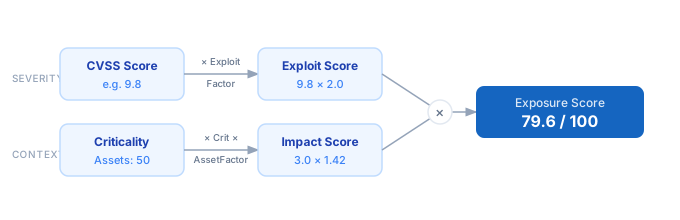
1. Look up the CVSS base score for the CVE on the NVD (nvd.nist.gov) or in your scanner output — this is your severity anchor (0–10). 2. Determine exploit maturity: enter 1 if no public exploit exists, 2 if a proof-of-concept is published (e.g. in ExploitDB or GitHub), or 3 if active exploitation in the wild is confirmed (e.g. CISA KEV). 3. Rate your affected asset criticality: 1 for non-critical internal systems, 2 for important business systems, 3 for core infrastructure, customer-facing services, or regulated data stores. 4. Count the number of affected assets in your environment and enter it — this logarithmically scales the risk score, so doubling assets does not double the score. 5. The calculator multiplies the four weighted factors and normalises to 0–100 using a fixed maximum baseline. 6. Use the resulting risk level (Low / Medium / High / Critical) to assign a patch SLA and schedule remediation.
Formula
Exposure Score (0–100) = min( CVSS × Exploit × Criticality × AssetFactor ÷ MaxRaw × 100, 100 )

CVSS         — base score from NVD, 0–10
Exploit      — 1.0 (no exploit) | 1.5 (PoC available) | 2.0 (active exploitation)
Criticality  — 1.0 (low) | 2.0 (medium) | 3.0 (high / critical infrastructure)
AssetFactor  — 1 + log₁₀(affected assets) ÷ 4
MaxRaw       — 105  (normalisation constant: 10 × 2.0 × 3.0 × 1.75)
Example CVE Exposure Calculations
Example 1 — Log4Shell-class: Critical infra, actively exploited
CVSS: 9.8  ×  Exploit: 2.0 (active)  ×  Criticality: 3.0 (high)  ×  AssetFactor: 1.42 (50 assets)
                                                                                                     ─────────
Raw Score: 9.8 × 2.0 × 3.0 × 1.42 = 83.6   →   Exposure Score: 83.6 ÷ 105 × 100 = 79.6 / 100
Risk Level: CRITICAL — patch immediately, treat as P0 incident
Example 2 — High-severity library CVE, PoC published, business systems
CVSS: 7.5  ×  Exploit: 1.5 (PoC)  ×  Criticality: 2.0 (medium)  ×  AssetFactor: 1.33 (20 assets)
                                                                                                      ─────────
Raw Score: 7.5 × 1.5 × 2.0 × 1.33 = 29.9   →   Exposure Score: 29.9 ÷ 105 × 100 = 28.5 / 100
Risk Level: MEDIUM — schedule patch within 2 weeks; monitor CISA KEV for escalation
Example 3 — Low-severity internal tool CVE, no exploit, 3 systems
CVSS: 5.0  ×  Exploit: 1.0 (none)  ×  Criticality: 1.0 (low)  ×  AssetFactor: 1.12 (3 assets)
                                                                                                    ─────────
Raw Score: 5.0 × 1.0 × 1.0 × 1.12 = 5.6   →   Exposure Score: 5.6 ÷ 105 × 100 = 5.3 / 100
Risk Level: LOW — add to next maintenance window; no emergency action required
Tips to Prioritise CVE Remediation Effectively
- › Check the CISA Known Exploited Vulnerabilities (KEV) catalog before assigning exploit maturity — if a CVE is listed there, use level 3 (Active Exploitation) regardless of your scanner output.
- › Use EPSS (Exploit Prediction Scoring System) from FIRST to sharpen exploit maturity decisions. A CVSS 9.0 with an EPSS score below 0.1% is far less urgent than a CVSS 6.5 with an EPSS above 50%.
- › Reduce affected asset count fast — network segmentation and retiring unused services lower your exposure score more than any single patching action.
- › Re-run the calculator after applying compensating controls. A WAF rule blocking the attack vector effectively drops your criticality weight from 3 to 2, potentially shifting a Critical finding to High and buying legitimate remediation time.
- › Integrate CVE scanning into CI/CD with tools like Trivy or Grype so new exposures are scored before they reach production. Pair with the CRA Compliance Score Calculator for regulatory reporting.
- › Set SLA thresholds in your runbooks: Critical (score ≥75) → 24 h, High (50–74) → 72 h, Medium (25–49) → 14 days, Low (<25) → next maintenance window.
Notes
- › Results are estimates and may vary based on actual usage.
- › Always validate against your production environment.