Device Lifecycle Compliance Calculator
GeneralEnter your fleet size, EOL device counts, and compliance target to instantly measure your device lifecycle compliance rate. See your at-risk exposure and how many devices need refresh.
Last updated: April 2026
This calculator is designed for real-world usage based on typical engineering scenarios and publicly available documentation.
The device lifecycle compliance calculator helps IT and security teams measure how much of their fleet remains within vendor-supported lifecycle. Compliance rate — the percentage of devices still receiving security patches — is a critical metric for enterprise security posture and is required by frameworks including CIS Controls, NIST SP 800-53, and the EU Cyber Resilience Act. This calculator takes four inputs: total fleet size, EOL device count (past end-of-life date), near-EOL device count (within your warning window), and your compliance target. It outputs your current in-support rate, compliance gap, and total at-risk device count — giving you the numbers you need for executive reporting, audit evidence, and refresh budget justification. Devices past their vendor end-of-life date receive no security patches. A single unpatched EOL firewall or endpoint on a critical network segment can expose your organisation to known CVEs that cannot be remediated without hardware refresh. Lifecycle compliance tracking forces these risks into visibility before they become incidents. For teams managing regulated fleets, pair this calculator with patch SLA tracking and CRA compliance scoring to build a complete picture of your device security posture. Near-EOL devices show your upcoming refresh workload — use them to drive procurement cycles well before devices fall out of support.
How to Calculate Device Lifecycle Compliance
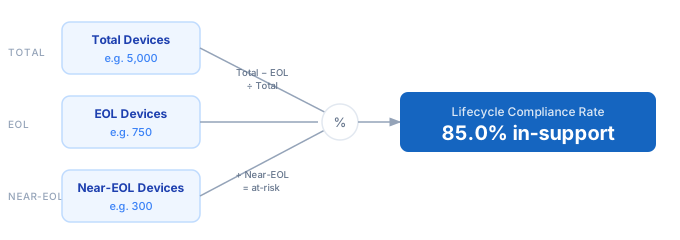
1. Count all active managed devices in your fleet — include endpoints, servers, network hardware, and IoT devices that should be within supported lifecycle. 2. Count devices at or past their vendor end-of-life date — these receive no further security patches and directly reduce your compliance rate. 3. Count devices within your near-EOL warning window (typically 90–180 days from EOL) — these are still compliant today but signal upcoming refresh work. 4. Set your compliance target — most security frameworks require 95%+ of devices to remain within supported lifecycle. 5. The calculator computes in-support rate ((Total − EOL) ÷ Total × 100), your gap to target, and at-risk device count (EOL + near-EOL).
Formula
Compliance Rate (%) = ((Total Devices − EOL Devices) ÷ Total Devices) × 100

EOL Exposure (%)      = (EOL Devices ÷ Total Devices) × 100

Near-EOL Exposure (%) = (Near-EOL Devices ÷ Total Devices) × 100

At-Risk Devices       = EOL Devices + Near-EOL Devices

Compliance Gap (%)    = Target (%) − Compliance Rate (%)

Total Devices    — all active managed devices in the fleet
EOL Devices      — devices past vendor end-of-life, receiving no patches
Near-EOL Devices — devices within warning window of EOL (e.g. 90 days)
Target (%)       — minimum in-support rate required by policy or regulation
Example Device Lifecycle Compliance Calculations
Example 1 — Enterprise laptop fleet, behind target
Fleet: 5,000 laptops   EOL: 750   Near-EOL: 300   Target: 95%

In-Support      = 5,000 − 750 = 4,250
Compliance Rate = (4,250 ÷ 5,000) × 100 = 85.0%
Gap             = 95% − 85% = 10% → 500 more devices must be refreshed
At-Risk         = 750 + 300 = 1,050 devices (21% of fleet)
Example 2 — Network switch estate, target exactly met
Fleet: 1,200 switches   EOL: 48   Near-EOL: 120   Target: 96%

In-Support      = 1,200 − 48 = 1,152
Compliance Rate = (1,152 ÷ 1,200) × 100 = 96.0%
Gap             = 96% − 96% = 0% (target exactly met)
At-Risk         = 48 + 120 = 168 switches (14% entering EOL within 90 days)
Example 3 — IoT sensor fleet, well above target
Fleet: 20,000 sensors   EOL: 200   Near-EOL: 400   Target: 90%

In-Support      = 20,000 − 200 = 19,800
Compliance Rate = (19,800 ÷ 20,000) × 100 = 99.0%
✓ Compliant — 9% buffer above 90% target
At-Risk         = 200 + 400 = 600 sensors (3% — low risk)
Tips to Improve Device Lifecycle Compliance
- › Track EOL dates in a CMDB or IT asset management tool — spreadsheets drift. Export device counts to this calculator quarterly to catch emerging compliance gaps before audits.
- › Set a near-EOL warning window of 90–180 days. Near-EOL devices in this calculator represent procurement lead time, not just risk — start refresh cycles before the EOL date, not after.
- › Prioritise EOL devices in your highest-risk network zones first. A single EOL firewall on a critical segment carries far more risk than 100 EOL printers on an isolated VLAN.
- › Map EOL status to CVE exposure. Devices past EOL won't receive patches for new CVEs — cross-reference with the CVE Exposure Calculator to quantify your unpatched risk surface.
- › Automate vendor EOL data feeds. Cisco, Microsoft, and Dell publish machine-readable EOL calendars — integrate them into your CMDB so compliance tracking doesn't rely on manual updates.
- › Include cloud instance types and managed runtimes in lifecycle tracking. AWS, Azure, and GCP regularly deprecate instance families — they follow the same EOL compliance logic as physical hardware.
Notes
- › Results are estimates and may vary based on actual usage.
- › Always validate against your production environment.