OTA Compliance Checker
GeneralEnter your fleet size and update counts to instantly check OTA compliance against your target. See your compliance gap and how long it will take to close it at your current rollout rate.
Last updated: April 2026
This calculator is designed for real-world usage based on typical engineering scenarios and publicly available documentation.
The OTA compliance checker helps device and platform engineers measure how effectively over-the-air updates are reaching their fleets. Compliance rate — the percentage of devices running the latest approved firmware or software — is a key metric in regulated industries (automotive, medical devices, industrial IoT) and increasingly required by frameworks like the EU Cyber Resilience Act. This calculator takes four inputs: total fleet size, number of already-updated devices, your compliance target, and days since the update was released. It outputs your current compliance rate, the gap to your target, how many additional devices need to update, and an estimated days-to-target based on your current daily adoption rate. OTA compliance tracking matters beyond regulatory checkboxes. Unpatched devices are exposed to known CVEs, and a large compliance gap signals that your update delivery pipeline — staging rings, rollout throttling, device connectivity — may need tuning. Use this checker before and after releases to quantify progress and report to stakeholders. For teams managing complex update pipelines, pair this calculator with patch SLA tracking and SBOM coverage analysis to get a complete picture of your fleet's security posture.
How to Calculate OTA Compliance Rate
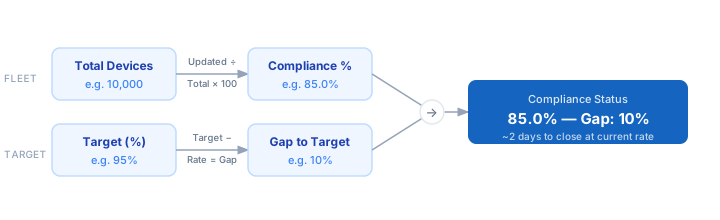
1. Count your total active devices in the fleet — include all devices that should be receiving the update, excluding decommissioned units. 2. Count devices that have confirmed receipt and application of the target firmware version — pull this from your device management platform. 3. Set your compliance target — regulatory frameworks often require 95–99%, internal SLAs vary by risk tier. 4. Enter days since the update was released to calculate your daily adoption rate. 5. The calculator divides updated devices by total fleet to get compliance rate, then computes gap to target and estimated days to close it at the current adoption rate.
Formula
Compliance Rate (%) = (Updated Devices ÷ Total Devices) × 100

Compliance Gap (%) = Target (%) − Compliance Rate (%)

Devices Still Needed = ⌈(Target% ÷ 100) × Total⌉ − Updated

Daily Adoption Rate = Updated Devices ÷ Days Since Release

Days to Target = ⌈Devices Still Needed ÷ Daily Adoption Rate⌉

Updated Devices  — devices confirmed running the target firmware/version
Total Devices    — total active devices in the fleet
Target (%)       — compliance threshold (e.g. 95% per regulatory SLA)
Days Since Release — calendar days since the update was made available
Example OTA Compliance Calculations
Example 1 — IoT fleet, behind target
Fleet: 10,000 devices   Updated: 8,500   Target: 95%   Days: 14

Compliance Rate = (8,500 ÷ 10,000) × 100 = 85.0%
Gap            = 95% − 85% = 10%
Devices Needed = ⌈(0.95 × 10,000)⌉ − 8,500 = 9,500 − 8,500 = 1,000
Daily Rate     = 8,500 ÷ 14 = 607 devices/day
Days to Target = ⌈1,000 ÷ 607⌉ = 2 days
Example 2 — Automotive ECU rollout, slow adoption
Fleet: 50,000 vehicles   Updated: 30,000   Target: 98%   Days: 30

Compliance Rate = (30,000 ÷ 50,000) × 100 = 60.0%
Gap            = 98% − 60% = 38%
Devices Needed = ⌈(0.98 × 50,000)⌉ − 30,000 = 49,000 − 30,000 = 19,000
Daily Rate     = 30,000 ÷ 30 = 1,000 vehicles/day
Days to Target = ⌈19,000 ÷ 1,000⌉ = 19 more days
Example 3 — SaaS agent fleet, target met
Fleet: 2,500 agents   Updated: 2,450   Target: 95%   Days: 7

Compliance Rate = (2,450 ÷ 2,500) × 100 = 98.0%
Gap            = 98% − 95% = 0% (target already exceeded)
Devices Needed = 0 (2,450 > required 2,375)
✓ Compliant — 3% buffer above 95% target
Tips to Improve OTA Compliance Rates
- › Use staged rollouts with automatic pause on error spikes — push to 1% of fleet first, monitor for 24 h, then expand. This catches bad updates before they widen the non-compliant gap.
- › Track "update acknowledgment" separately from "update applied" — devices that download but fail to apply inflate your progress metrics and mask real compliance gaps.
- › Set per-segment compliance targets, not just fleet-wide. A 95% overall rate may hide a critical segment (e.g. safety-critical ECUs) sitting at 70%.
- › Monitor device connectivity before releases. Devices offline at rollout time skew your daily adoption rate downward — compensate by extending your measurement window.
- › Automate compliance reporting: pull daily updated-device counts from your device management API, feed them into this formula, and alert when the gap exceeds your SLA threshold.
- › Cross-reference your OTA compliance rate with your Patch SLA Calculator to confirm that the update pipeline is meeting its delivery commitments, not just its coverage targets.
Notes
- › Results are estimates and may vary based on actual usage.
- › Always validate against your production environment.