Encryption Coverage Calculator
GeneralEnter your total assets and how many are encrypted at rest and in transit to get an instant coverage score. Ideal for security audits, compliance reviews, and gap analysis.
Last updated: April 2026
This calculator is designed for real-world usage based on typical engineering scenarios and publicly available documentation.
An encryption coverage calculator gives security teams a fast, quantified view of how much of their data estate is protected. Without a coverage number, "most of our data is encrypted" is just a guess — regulators, auditors, and incident responders need a percentage. This tool covers both dimensions that matter: encryption at rest (data stored on disk, in databases, in object storage) and encryption in transit (data moving over networks, APIs, and service meshes). Multiply across your total asset count and you get separate scores for each dimension plus a combined overall coverage metric. Use this calculator when preparing for a SOC 2, ISO 27001, or CRA audit, during a security posture review, or after a new system is added to your inventory. It also helps prioritise remediation: if at-rest coverage is 95% but in-transit is 60%, you know exactly where to focus next. The formula works for any unit — databases, microservices, S3 buckets, IoT endpoints, or on-prem servers. Define "asset" consistently across your inventory and the resulting percentage is comparable over time.
How to Calculate Encryption Coverage
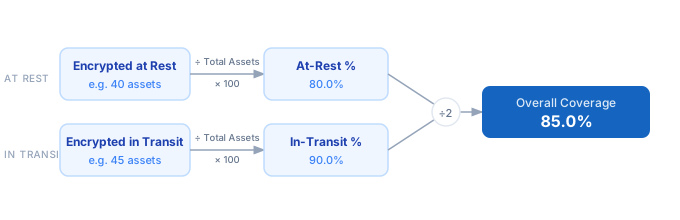
1. Count your total data assets — databases, services, storage buckets, or endpoints. 2. Count how many assets have encryption at rest enabled (AES-256, LUKS, cloud-managed KMS, etc.). 3. Count how many assets encrypt data in transit (TLS 1.2+, mTLS, HTTPS). 4. Divide each encrypted count by the total to get at-rest and in-transit coverage percentages. 5. Average the two percentages to get your overall encryption coverage score.
Formula
At-Rest Coverage (%)    = (Encrypted at Rest   ÷ Total Assets) × 100
In-Transit Coverage (%) = (Encrypted in Transit ÷ Total Assets) × 100
Overall Coverage (%)    = (At-Rest Coverage + In-Transit Coverage) ÷ 2

Total Assets        — number of systems, services, or data stores in scope
Encrypted at Rest   — assets with storage-layer encryption enabled
Encrypted in Transit — assets communicating over encrypted channels (TLS/mTLS)
Example Encryption Coverage Calculations
Example 1 — Mid-size SaaS (50 assets)
Total assets: 50
Encrypted at rest: 40   →  40 ÷ 50 × 100  =  80.0%
Encrypted in transit: 45 → 45 ÷ 50 × 100  =  90.0%
                                              ─────────────
Overall coverage: (80.0 + 90.0) ÷ 2  =  85.0%
Gap: 10 assets not encrypted at rest → prioritise storage remediation.
Example 2 — IoT fleet (200 devices)
Total devices: 200
Encrypted at rest (secure element): 120  →  60.0%
Encrypted in transit (TLS):         160  →  80.0%
                                          ─────────────
Overall coverage: (60.0 + 80.0) ÷ 2  =  70.0%
80 devices lack at-rest encryption — flag for firmware update before CRA audit.
Example 3 — Enterprise microservices (120 services)
Total services: 120
Encrypted at rest (KMS-managed): 114  →  95.0%
Encrypted in transit (mTLS mesh):  108  →  90.0%
                                          ─────────────
Overall coverage: (95.0 + 90.0) ÷ 2  =  92.5%
Remaining 6 at-rest gaps are legacy batch jobs — schedule migration to meet 100% target.
Tips to Improve Encryption Coverage
- › Use your cloud provider's default encryption settings — AWS S3, GCP Cloud Storage, and Azure Blob all support server-side encryption with a single toggle. Enable it at the account level so new buckets are encrypted automatically.
- › Enforce TLS 1.2 minimum at the load balancer or API gateway rather than per-service. One policy change can close in-transit gaps across dozens of services simultaneously.
- › Scan for encryption gaps with infrastructure-as-code tools: tfsec, Checkov, or AWS Config rules flag unencrypted resources before they reach production.
- › Rotate encryption keys on a schedule. Coverage percentage measures whether encryption is present, not whether keys are fresh. Key rotation is a separate control that also affects your compliance posture.
- › Include encryption status in your asset inventory (CMDB or SBOM). Without a machine-readable record, recalculating coverage each quarter becomes manual and error-prone.
- › For IoT and embedded devices, check whether secure boot and encrypted storage are enabled at the firmware level — hardware encryption is often available but disabled by default.
Notes
- › Results are estimates and may vary based on actual usage.
- › Always validate against your production environment.